If you are using Visual Studio 2010, you can use its static code analysis: open Project Properties -> Configuartion Properties -> Code Analysis. Select desired build configuration and platform and tick Enable Code Analysis for C/C++ on Build. Output window will show code analysis report (search for Running Code Analysis for C/C++... lines).
I want to show here how it looks in the practice. Let's say we have some smelly code:
C.h:
#ifndef _C_H_
#define _C_H_

class C
{
   // unitialized member
   int m_n;
public:
   C()
   {
      // unused variable
      int j;
   }

   void Init(char ch)
   {
      // C-style pointer cast
      m_n = (int)ch;
   }
};
#endif // _C_H_
main.cpp:
#include "C.h"

// unused function
int foo()
{
   int n;
   return 0;
}

int main()
{
   // unused variable
   int n1;

   // dereferencing unitialized pointer
   int* pInt1;
   *pInt1 = 1;

   // dereferencing NULL pointer
   int* pInt2 = 0;
   *pInt2 = 2;

   // memory leak - no delete
   int* pInt3 = new int(2);

   // scope of n2 is unecessarily main()
   int n2 = 0;

   {
      char ch = 2;
      n2 = (int)ch;
   }

   int arr[2];
   arr[2] = 3;

   return 0;
}
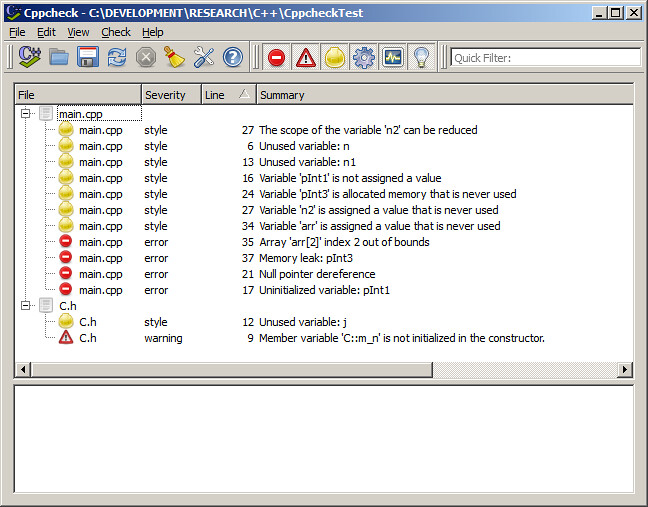
I played recently with Cppcheck and this is what it reports for the code above:
Visual Studio prints code analysis messages in the Output window and for the code above it contains the following:
1>------ Build started: Project: CppcheckTest, Configuration: Debug Win32 ------
1>Build started 15/02/2012 19:49:12.
1>InitializeBuildStatus:
1> Touching "Debug\CppcheckTest.unsuccessfulbuild".
1>ClCompile:
1> main.cpp
1>c:\...\cppchecktest\c.h(12): warning C4101: 'j' : unreferenced local variable
1>c:\...\cppchecktest\main.cpp(6): warning C4101: 'n' : unreferenced local variable
1>c:\...\cppchecktest\main.cpp(13): warning C4101: 'n1' : unreferenced local variable
1>c:\...\cppchecktest\main.cpp(35): warning C6201: Index '2' is out of valid index range '0' to '1' for possibly stack allocated buffer 'arr'
1>c:\...\cppchecktest\main.cpp(17): warning C6001: Using uninitialized memory 'pInt1': Lines: 13, 16, 17
1>c:\...\cppchecktest\main.cpp(21): warning C6011: Dereferencing NULL pointer 'pInt2': Lines: 13, 16, 17, 20, 21
1>c:\...\cppchecktest\main.cpp(35): warning C6386: Buffer overrun: accessing 'arr', the writable size is '8' bytes, but '12' bytes might be written: Lines: 13, 16, 17, 20, 21, 24, 27, 30, 31, 34, 35
1>c:\...\cppchecktest\main.cpp(17): warning C4700: uninitialized local variable 'pInt1' used
1>ManifestResourceCompile:
1> All outputs are up-to-date.
1>Manifest:
1> All outputs are up-to-date.
1>LinkEmbedManifest:
1> All outputs are up-to-date.
1> CppcheckTest.vcxproj -> C:\...\CppcheckTest\Debug\CppcheckTest.exe
1>FinalizeBuildStatus:
1> Deleting file "Debug\CppcheckTest.unsuccessfulbuild".
1> Touching "Debug\CppcheckTest.lastbuildstate".
1>
1>Build succeeded.
1>
1>Time Elapsed 00:00:04.38
========== Build: 1 succeeded, 0 failed, 0 up-to-date, 0 skipped ==========
1>Build started 15/02/2012 19:49:12.
1>InitializeBuildStatus:
1> Touching "Debug\CppcheckTest.unsuccessfulbuild".
1>ClCompile:
1> main.cpp
1>c:\...\cppchecktest\c.h(12): warning C4101: 'j' : unreferenced local variable
1>c:\...\cppchecktest\main.cpp(6): warning C4101: 'n' : unreferenced local variable
1>c:\...\cppchecktest\main.cpp(13): warning C4101: 'n1' : unreferenced local variable
1>c:\...\cppchecktest\main.cpp(35): warning C6201: Index '2' is out of valid index range '0' to '1' for possibly stack allocated buffer 'arr'
1>c:\...\cppchecktest\main.cpp(17): warning C6001: Using uninitialized memory 'pInt1': Lines: 13, 16, 17
1>c:\...\cppchecktest\main.cpp(21): warning C6011: Dereferencing NULL pointer 'pInt2': Lines: 13, 16, 17, 20, 21
1>c:\...\cppchecktest\main.cpp(35): warning C6386: Buffer overrun: accessing 'arr', the writable size is '8' bytes, but '12' bytes might be written: Lines: 13, 16, 17, 20, 21, 24, 27, 30, 31, 34, 35
1>c:\...\cppchecktest\main.cpp(17): warning C4700: uninitialized local variable 'pInt1' used
1>ManifestResourceCompile:
1> All outputs are up-to-date.
1>Manifest:
1> All outputs are up-to-date.
1>LinkEmbedManifest:
1> All outputs are up-to-date.
1> CppcheckTest.vcxproj -> C:\...\CppcheckTest\Debug\CppcheckTest.exe
1>FinalizeBuildStatus:
1> Deleting file "Debug\CppcheckTest.unsuccessfulbuild".
1> Touching "Debug\CppcheckTest.lastbuildstate".
1>
1>Build succeeded.
1>
1>Time Elapsed 00:00:04.38
========== Build: 1 succeeded, 0 failed, 0 up-to-date, 0 skipped ==========
Links and References:
Analyzing Application Quality by Using Code Analysis Tools (MSDN)
How to: Enable and Disable Automatic Code Analysis for C/C++ (MSDN)
Cppcheck


