Monday, 17 January 2022

Linux Environment Variables


Working with Environment Variables

To list all environment variables and their values use:

$ env

To display the value of some particular env var use echo $ENV_VAR_NAME. Example:

$ echo $GOPATH
/home/test_user/dev/go

To set environment variables for the single command:

Example:

$ env GOOS=linux GOARCH=amd64 go build cmd/main.go

From the executable's point of view, the same would have been achieved without using env:

$ GOOS=linux GOARCH=amd64 go build cmd/main.go

To set environment variables for the current terminal session:

$ export GOPATH=/mnt/c/dev/go

export is a bash builtin. export key=value is extended syntax and should not be used in portable scripts (i.e. #! /bin/sh)

What's the difference between set, export and env and when should I use each?
What is the difference between set, env, declare and export when setting a variable in a Linux shell?

If some bash script calls executable which requires some env variables, we also need to use export.Example:

demo.sh:

#!/bin/bash
...
echo
echo Env variables:
go env
export CGO_ENABLED=0
export GOOS=linux
export GOARCH=amd64 
echo
echo Env variables:
go env
go build -o './bin/myapp' -v './cmd/main.go'

...gives the output:

Env variables:
[16:33:25][Step 4/7] GOARCH="amd64"
[16:33:25][Step 4/7] GOOS="linux"
[16:33:25][Step 4/7] CGO_ENABLED="1"
...
[16:33:25][Step 4/7] 
[16:33:25][Step 4/7] Env variables:
[16:33:25][Step 4/7] GOARCH="amd64"
[16:33:25][Step 4/7] GOOS="linux"
[16:33:25][Step 4/7] CGO_ENABLED="0"
...

How do I add environment variables?
How to set an environment variable only for the duration of the script?

To add en environment variable during the session of a particular user (and also make them available in terminal) append the desired var name and its value to ~/.profile file. Example:

export GOROOT=/usr/local/go
export GOPATH=$HOME/go
export PATH=$GOPATH/bin:$GOROOT/bin:$PATH

We'd need to restart the terminal in order to get these changes visible but to make terminal fetch them in the current session, we can update the current shell session with:

source ~/.profile

Alternatively we could have used a dot command:


. ~/.profile 


To add a new or modify existing environment variable permanently (to make environment variable persistent) (for non-root user) we need to change ~/.bashrc:

Example of ~/.bashrc snippet:

# ~/.bashrc: executed by bash(1) for non-login shells.
# see /usr/share/doc/bash/examples/startup-files (in the package bash-doc)
# for examples
...
export GOPATH=$HOME/dev/go
export PATH=$PATH:$GOPATH/bin


To do the same for root user, open /etc/environment:

$ sudo gedit /etc/environment

...and add desired path:

PATH="/usr/local/sbin:/usr/local/bin:/usr/sbin:/usr/bin:/sbin:/bin:/usr/games:/usr/local/games"
GOPATH="/home/test_user/dev/go"


Linux Default Environment Variables


user@host:~/$ echo $HOSTNAME
host


Friday, 7 January 2022

How to upgrade docker-compose on Linux

Let's check the version of currently installed docker-compose:
 
$ docker-compose --version
docker-compose version 1.27.4, build 40524192

 
Let's verify the path to executable:

$ which docker-compose
/usr/local/bin/docker-compose

To upgrade docker-compose, we first need to remove the old version:

$ sudo rm /usr/local/bin/docker-compose
[sudo] password for user: 
 
We can then download the binary of the latest stable version (1.29.2 at time of writing)
 
$ sudo curl -L "https://github.com/docker/compose/releases/download/1.29.2/docker-compose-$(uname -s)-$(uname -m)" -o /usr/local/bin/docker-compose
  % Total    % Received % Xferd  Average Speed   Time    Time     Time  Current
                                 Dload  Upload   Total   Spent    Left  Speed
100   664  100   664    0     0   2114      0 --:--:-- --:--:-- --:--:--  2121
100 12.1M  100 12.1M    0     0  2544k      0  0:00:04  0:00:04 --:--:-- 2723k

 
Add permissions to execute the newly downloaded binary: 

$ sudo chmod +x /usr/local/bin/docker-compose
 
Let's verify the new version:
 
$ docker-compose --version
docker-compose version 1.29.2, build 5becea4c

References


Wednesday, 5 January 2022

When you need to run "nvm install N/A"...

I noticed in my Terminal (within VSCode) the following:


nvm is Node Version Manager and nvm install installs desired version of Node.

nvm uses the version aliases, some of which are:
  • default - version set to be default in shell
  • node, stable - point to the latest stable version
  • unstable - points to the latest unstable version
  • lts/* - points to the latest long term support line
  • lts/xyz - points to the latest node in xyz line (major release) e.g. erbium, fermium, gallium
 
To Node versions pointed to by aliases, it is possible to use nvm alias command. If alias is pointing to Node version that is not installed locally, N/A is shown:

$ nvm alias 
default -> 11.13.0 (-> N/A)
node -> stable (-> v16.13.1) (default)
stable -> 16.13 (-> v16.13.1) (default)
iojs -> N/A (default)
unstable -> N/A (default)
lts/* -> lts/gallium (-> v16.13.1)
lts/argon -> v4.9.1 (-> N/A)
lts/boron -> v6.17.1 (-> N/A)
lts/carbon -> v8.17.0 (-> N/A)
lts/dubnium -> v10.24.1 (-> N/A)
lts/erbium -> v12.22.7 (-> N/A)
lts/fermium -> v14.18.2 (-> N/A)
lts/gallium -> v16.13.1
 
nvm ls lists all locally installed Node versions, system version of Node, together with aliases.
 
$ nvm ls
       v16.13.1
->       system
default -> 11.13.0 (-> N/A)
node -> stable (-> v16.13.1) (default)
stable -> 16.13 (-> v16.13.1) (default)
iojs -> N/A (default)
unstable -> N/A (default)
lts/* -> lts/gallium (-> v16.13.1)
lts/argon -> v4.9.1 (-> N/A)
lts/boron -> v6.17.1 (-> N/A)
lts/carbon -> v8.17.0 (-> N/A)
lts/dubnium -> v10.24.1 (-> N/A)
lts/erbium -> v12.22.7 (-> N/A)
lts/fermium -> v14.18.2 (-> N/A)
lts/gallium -> v16.13.1

Path to system-installed Node:

$ nvm which system 
/usr/bin/node
 
...and it's version:
 
$ /usr/bin/node --version
v16.13.1
 
In our case  default shell version is set to 11.13.0 which is not installed locally (I might have uninstalled it some time ago). That's why I got this in my Terminal:

N/A: version "N/A -> N/A" is not yet installed.
You need to run "nvm install N/A" to install it before using it.
 

To rectify this, I set default shell version to node:

$ nvm alias default node
default -> node (-> v16.13.1)
 
 
After this, default alias was showing the installed version:

$ nvm ls
->     v16.13.1
         system
default -> node (-> v16.13.1)
node -> stable (-> v16.13.1) (default)
stable -> 16.13 (-> v16.13.1) (default)
iojs -> N/A (default)
unstable -> N/A (default)
lts/* -> lts/gallium (-> v16.13.1)
lts/argon -> v4.9.1 (-> N/A)
lts/boron -> v6.17.1 (-> N/A)
lts/carbon -> v8.17.0 (-> N/A)
lts/dubnium -> v10.24.1 (-> N/A)
lts/erbium -> v12.22.7 (-> N/A)
lts/fermium -> v14.18.2 (-> N/A)
lts/gallium -> v16.13.1

Monday, 27 December 2021

Unsupervised Machine Learning

Data is, by default, unlabeled. Labeling data is manual (or somewhat automated) process, thus timely and expensive. Unsupervised machine learning uses unlabeled data (raw, cheap, widely available) for model training. Nevertheless, this comes with the cost of unsupervised learning requiring higher volumes of data for the training if comparing to supervised learning.

Typical use cases for unsupervised ML:
  • Clustering
  • Anomaly Detection
  • Dimensionality Reduction

Clustering


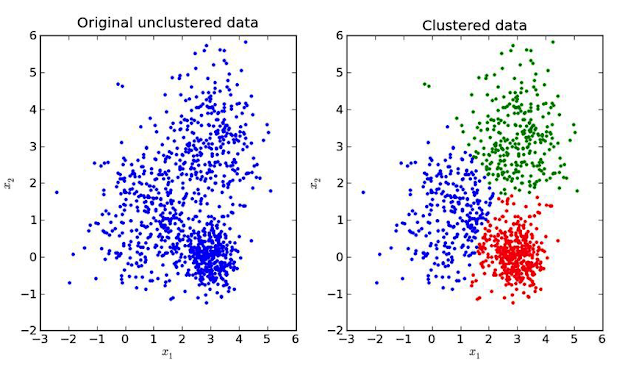
Unsupervised learning algorithms extract features and patterns from unlabeled data which can then be used to label and group together data points that share same or similar features. This is known as clustering and is one of typical problems solved by unsupervised learning.

image source: KDNuggets

Clustering algorithms:
  • k-means clustering
  • neural networks
    • hypothesis function is a mapping from input space back into this input space
    • the goal of an unsupervised learning loss function is to measure the difference between the hypothesis function and the input itself

Example: Image set clustering


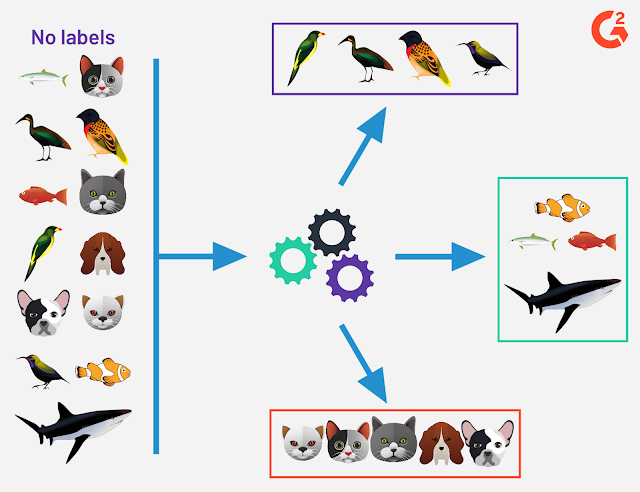
Each cluster contains images which have the same object in them. Model does not know the name of that object, that it is e.g. bird. It only knows (learns) that objects in each cluster share the same/similar features. We might only need to set in advance the number of clusters we want to get.

In supervised learning, if we have a labeled dataset which contains images of birds, fish and mammals, our model will learn to identify if the image contains a bird, a fish or a mammal. In unsupervised learning, model will learn to distinguish and separate images that share same/similar features and it would group them in three clusters but it would not know that in one cluster are birds and in another fish for example, it would just know that there are three (or maybe even more) types of objects. 


image credits: Devin Pickell, g2.com


Example: Customer segmentation


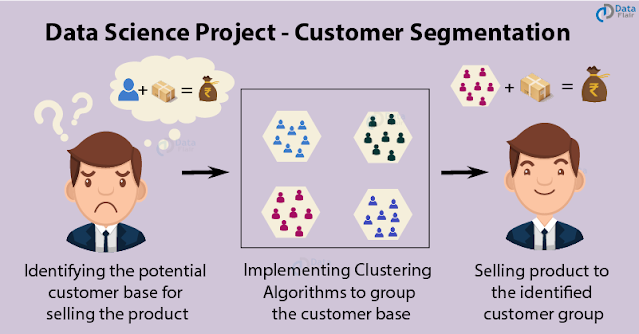
Each cluster contains customers of some differentiable profile. This helps in e.g. targeted marketing.

image source: data-flair.training


Example: Spam detection


Unsupervised learning algorithm can analyze huge volumes of emails and uncover the features and patterns that indicate spam (and keep getting better at flagging spam over time).


Anomaly Detection


Another type of problems solved by unsupervised learning is anomaly detection. The goal here is to find abnormal data points. Model is trained to detect if data point has some unusual features.

Example: Fraud detection (Anomaly Detection)


Fraudulent transactions tend to involve larger sums of money. Fraud only occurs with transfers and cash-out transactions.

image credit: Shirin Elsinghorst, codecentric.de

Class 0 is normal transaction. Class 1 is fraudulent transaction.


Dimensionality Reduction


Data dimensionality refers to feature space. Each data point can be defined as a vector in N-dimensional space where N is number of features. Some features are more and some less important, in a way how much do they contribute in differentiating data points. The more features, the more complex model is, the more time and storage is required for its training and inference. The idea here is to reduce number of features without losing the semantic meaning of the data. E.g. bird can still be distinguished from other animals by recognising that it has features like beak, wings and a tail but eye color or feather color pattern is not important.

Some dimensionality reduction techniques:
  • Independent Components Analysis (ICA)
  • Principal Components Analysis (PCA)
Sometimes, before applying k-means clustering, a dimensionality reduction is applied on data.


Principal Component Analysis (PCA)


Transforms data from d-dimensional to p-dimensional feature space where p < d. It first finds the dimension of the highest variance (e.g. direction where the data is most spread out) - principal component. Data points are then projected onto this dimension. Small amount of information gets lost but overall data integrity is not changed.

PCA is based on reducing correlation (linear dependence) between features. If two features are linearly dependent, we can derive value of one feature if value of the another one is known. PCA removes this redundancy by projecting a set of linearly dependent features into a smaller set of new, uncorrelated features. 


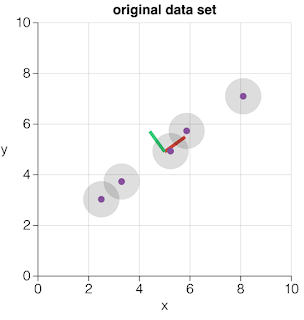
Original data points are in 2-dimensional feature space. Features are denoted as x and y.
 

PCA finds the direction along which values have the highest variance. It is a red diagonal in our case.


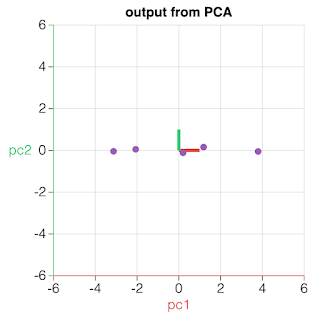
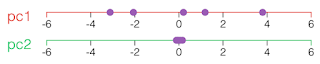
Data points are projected onto component which carries the highest variance. That principal component becomes a newly derived feature. The next principal component (pc2) which carries the most variance is the one defined by the line perpendicular to the direction of pc1.


As pc2 exhibits low variance, this component does not carry much information (that helps differentiating data points). It can be ignored (small amount of information is lost) thus reducing the feature space to a single dimension.

image credits: V. Powell, setosa.io

Example: Solution to “Cocktail Party” problem


Dimension Reduction via Independent Components Analysis (ICA) is used to extract independent sources of audio signal from a recording which contains mixed signals.


image source: 2014, J. Shlens: "A Tutorial on Independent Component Analysis"

References


Monday, 20 December 2021

Installing Python3 on Mac Big Sur

Mac comes with Python 2 by default and I wanted to install and use Python 3. I installed it by using brew: 

% brew install python3
Running `brew update --preinstall`...
==> Auto-updated Homebrew!
Updated 2 taps (homebrew/core and homebrew/cask).
==> New Formulae
abi-compliance-checker     gotify                     pam-reattach
abi-dumper                 hurl                       payload-dumper-go
biber                      imap-backup                pip-audit
brigade-cli                isa-l                      pocsuite3
chroma                     jsonschema                 rpki-client
coursier                   kubernetes-cli@1.22        salt-lint
djhtml                     lua-language-server        sevenzip
dynomite                   mcfly                      statix
fastp                      mist                       tsduck
goawk                      openliberty-jakartaee9     vtable-dumper
goplus                     openliberty-webprofile9
==> Updated Formulae
Updated 1431 formulae.
==> Deleted Formulae
ape             es              jerasure        makepp          swiftplate
balance         eventlog        kakasi          marst           torrentcheck
bbcolors        flasm           l-smash         mboxgrep        udns
colorsvn        fondu           libbind         md              whitedb
contacts        gconf           liberasurecode  namazu          xidel
csv-fix         gcore           libmill         postmark        xtail
dlite           gf-complete     libopendkim     redsocks        zdelta
dnsrend         git-hooks       libpuzzle       sdhash
drip            git-sh          libvbucket      shorten
dshb            henplus         m2c             srmio
eject           httptunnel      magnetix        svdlibc
==> New Casks
appflowy            finalshell          projector           teamspeak-client
appium-inspector    folder-colorizer    schildichat         tidgi
centered            grammarly-desktop   sitala              volley
citrix-workspace    handyprintpro       soundtoys           wolai
cron                linearmouse         spaceid             xstation5
emmetapp            ludwig              supermjograph
equinox             macrorecorder       tablecruncher
==> Updated Casks
Updated 648 casks.
==> Deleted Casks
air-connect                              lelivrescolairefr
aja-system-test                          napari
anka-build-cloud-registry                octoscreen
asc-timetables                           platelet
avast-secureline-vpn                     pullover
chameleon-ssd-optimizer                  punto-switcher
chocolat                                 qit
domainbrain                              river-sparkle
drama                                    scrutiny
everweb                                  tmnotifier
freeter                                  unity-linux-support-for-editor
gitbook                                  unity-lumin-support-for-editor
inboard                                  visicut

python@3.9 3.9.6 is already installed but outdated (so it will be upgraded).
==> Downloading https://ghcr.io/v2/homebrew/core/gdbm/manifests/1.22
######################################################################## 100.0%
==> Downloading https://ghcr.io/v2/homebrew/core/gdbm/blobs/sha256:7e9737ec99942
==> Downloading from https://pkg-containers.githubusercontent.com/ghcr1/blobs/sh
######################################################################## 100.0%
==> Downloading https://ghcr.io/v2/homebrew/core/ca-certificates/manifests/2021-
######################################################################## 100.0%
==> Downloading https://ghcr.io/v2/homebrew/core/ca-certificates/blobs/sha256:1b
==> Downloading from https://pkg-containers.githubusercontent.com/ghcr1/blobs/sh
######################################################################## 100.0%
==> Downloading https://ghcr.io/v2/homebrew/core/openssl/1.1/manifests/1.1.1m
######################################################################## 100.0%
==> Downloading https://ghcr.io/v2/homebrew/core/openssl/1.1/blobs/sha256:ad0413
==> Downloading from https://pkg-containers.githubusercontent.com/ghcr1/blobs/sh
######################################################################## 100.0%
==> Downloading https://ghcr.io/v2/homebrew/core/readline/manifests/8.1.1
######################################################################## 100.0%
==> Downloading https://ghcr.io/v2/homebrew/core/readline/blobs/sha256:c596199dc
==> Downloading from https://pkg-containers.githubusercontent.com/ghcr1/blobs/sh
######################################################################## 100.0%
==> Downloading https://ghcr.io/v2/homebrew/core/sqlite/manifests/3.37.0
######################################################################## 100.0%
==> Downloading https://ghcr.io/v2/homebrew/core/sqlite/blobs/sha256:ae0b38a858a
==> Downloading from https://pkg-containers.githubusercontent.com/ghcr1/blobs/sh
######################################################################## 100.0%
==> Downloading https://ghcr.io/v2/homebrew/core/python/3.9/manifests/3.9.9
######################################################################## 100.0%
==> Downloading https://ghcr.io/v2/homebrew/core/python/3.9/blobs/sha256:4b56d09
==> Downloading from https://pkg-containers.githubusercontent.com/ghcr1/blobs/sh
######################################################################## 100.0%
==> Upgrading python3
  3.9.6 -> 3.9.9 

==> Installing dependencies for python@3.9: gdbm, ca-certificates, openssl@1.1, readline and sqlite
==> Installing python@3.9 dependency: gdbm
==> Pouring gdbm--1.22.big_sur.bottle.tar.gz
🍺  /usr/local/Cellar/gdbm/1.22: 24 files, 957.9KB
==> Installing python@3.9 dependency: ca-certificates
==> Pouring ca-certificates--2021-10-26.all.bottle.tar.gz
==> Regenerating CA certificate bundle from keychain, this may take a while...
🍺  /usr/local/Cellar/ca-certificates/2021-10-26: 3 files, 208.5KB
==> Installing python@3.9 dependency: openssl@1.1
==> Pouring openssl@1.1--1.1.1m.big_sur.bottle.tar.gz
🍺  /usr/local/Cellar/openssl@1.1/1.1.1m: 8,081 files, 18.5MB
==> Installing python@3.9 dependency: readline
==> Pouring readline--8.1.1.big_sur.bottle.tar.gz
🍺  /usr/local/Cellar/readline/8.1.1: 48 files, 1.6MB
==> Installing python@3.9 dependency: sqlite
==> Pouring sqlite--3.37.0.big_sur.bottle.tar.gz
🍺  /usr/local/Cellar/sqlite/3.37.0: 11 files, 4.3MB
==> Installing python@3.9
==> Pouring python@3.9--3.9.9.big_sur.bottle.tar.gz
==> /usr/local/Cellar/python@3.9/3.9.9/bin/python3 -m ensurepip
==> /usr/local/Cellar/python@3.9/3.9.9/bin/python3 -m pip install -v --no-deps -
==> Caveats
Python has been installed as
  /usr/local/bin/python3

Unversioned symlinks `python`, `python-config`, `pip` etc. pointing to
`python3`, `python3-config`, `pip3` etc., respectively, have been installed into
  /usr/local/opt/python@3.9/libexec/bin

You can install Python packages with
  pip3 install <package>
They will install into the site-package directory
  /usr/local/lib/python3.9/site-packages

tkinter is no longer included with this formula, but it is available separately:
  brew install python-tk@3.9

See: https://docs.brew.sh/Homebrew-and-Python
==> Summary
🍺  /usr/local/Cellar/python@3.9/3.9.9: 3,080 files, 55.0MB
==> `brew cleanup` has not been run in the last 30 days, running now...
Disable this behaviour by setting HOMEBREW_NO_INSTALL_CLEANUP.
Hide these hints with HOMEBREW_NO_ENV_HINTS (see `man brew`).
Removing: /usr/local/Cellar/gdbm/1.20... (24 files, 825.0KB)
Removing: /Users/bojan/Library/Caches/Homebrew/gdbm--1.20... (221KB)
Removing: /Users/bojan/Library/Caches/Homebrew/mpdecimal--2.5.1... (548.3KB)
Removing: /usr/local/Cellar/openssl@1.1/1.1.1k... (8,071 files, 18.5MB)
Removing: /Users/bojan/Library/Caches/Homebrew/openssl@1.1--1.1.1k... (5.4MB)
Removing: /usr/local/Cellar/python@3.9/3.9.6... (3,085 files, 54.7MB)
Removing: /Users/bojan/Library/Caches/Homebrew/python@3.9--3.9.6... (13.6MB)
Removing: /usr/local/Cellar/readline/8.1... (48 files, 1.6MB)
Removing: /Users/bojan/Library/Caches/Homebrew/readline--8.1... (536KB)
Removing: /Users/bojan/Library/Caches/Homebrew/rtmpdump--2.4+20151223_1... (170.2KB)
Removing: /usr/local/Cellar/sqlite/3.36.0... (11 files, 4.2MB)
Removing: /Users/bojan/Library/Caches/Homebrew/sqlite--3.36.0... (2MB)
Removing: /Users/bojan/Library/Caches/Homebrew/xz--5.2.5... (417.6KB)
Removing: /Users/bojan/Library/Caches/Homebrew/you-get--0.4.1536... (2.2MB)
Removing: /Users/bojan/Library/Caches/Homebrew/xz_bottle_manifest--5.2.5... (5.7KB)
Removing: /Users/bojan/Library/Caches/Homebrew/rtmpdump_bottle_manifest--2.4+20151223_1... (7KB)
Removing: /Users/bojan/Library/Caches/Homebrew/sqlite_bottle_manifest--3.36.0... (5.9KB)
Removing: /Users/bojan/Library/Caches/Homebrew/openssl@1.1_bottle_manifest--1.1.1k... (6KB)
Removing: /Users/bojan/Library/Caches/Homebrew/python@3.9_bottle_manifest--3.9.6... (15.4KB)
Removing: /Users/bojan/Library/Caches/Homebrew/readline_bottle_manifest--8.1... (5.5KB)
Removing: /Users/bojan/Library/Caches/Homebrew/you-get_bottle_manifest--0.4.1536... (11.2KB)
Removing: /Users/bojan/Library/Caches/Homebrew/gdbm_bottle_manifest--1.20... (5.2KB)
Removing: /Users/bojan/Library/Caches/Homebrew/mpdecimal_bottle_manifest--2.5.1... (5.2KB)
Removing: /Users/bojan/Library/Logs/Homebrew/gdbm... (64B)
Removing: /Users/bojan/Library/Logs/Homebrew/mpdecimal... (64B)
Removing: /Users/bojan/Library/Logs/Homebrew/rtmpdump... (64B)
Removing: /Users/bojan/Library/Logs/Homebrew/readline... (64B)
Removing: /Users/bojan/Library/Logs/Homebrew/sqlite... (64B)
Removing: /Users/bojan/Library/Logs/Homebrew/xz... (64B)
Removing: /Users/bojan/Library/Logs/Homebrew/openssl@1.1... (64B)
Removing: /Users/bojan/Library/Logs/Homebrew/you-get... (64B)
Removing: /Users/bojan/Library/Logs/Homebrew/python@3.9... (2 files, 2.4KB)
Pruned 0 symbolic links and 2 directories from /usr/local
==> Upgrading 1 dependent:
Disable this behaviour by setting HOMEBREW_NO_INSTALLED_DEPENDENTS_CHECK.
Hide these hints with HOMEBREW_NO_ENV_HINTS (see `man brew`).
you-get 0.4.1536 -> 0.4.1555
==> Downloading https://ghcr.io/v2/homebrew/core/python/3.10/manifests/3.10.1
######################################################################## 100.0%
==> Downloading https://ghcr.io/v2/homebrew/core/python/3.10/blobs/sha256:c4f29a
==> Downloading from https://pkg-containers.githubusercontent.com/ghcr1/blobs/sh
######################################################################## 100.0%
==> Downloading https://ghcr.io/v2/homebrew/core/you-get/manifests/0.4.1555
######################################################################## 100.0%
==> Downloading https://ghcr.io/v2/homebrew/core/you-get/blobs/sha256:df0dc12c74
==> Downloading from https://pkg-containers.githubusercontent.com/ghcr1/blobs/sh
######################################################################## 100.0%
==> Upgrading you-get
  0.4.1536 -> 0.4.1555 

==> Installing dependencies for you-get: python@3.10
==> Installing you-get dependency: python@3.10
==> Pouring python@3.10--3.10.1.big_sur.bottle.tar.gz
==> /usr/local/Cellar/python@3.10/3.10.1/bin/python3 -m ensurepip
==> /usr/local/Cellar/python@3.10/3.10.1/bin/python3 -m pip install -v --no-deps
🍺  /usr/local/Cellar/python@3.10/3.10.1: 3,132 files, 56MB
==> Installing you-get
==> Pouring you-get--0.4.1555.big_sur.bottle.tar.gz
==> Caveats
To use post-processing options, run `brew install ffmpeg` or `brew install libav`.
==> Summary
🍺  /usr/local/Cellar/you-get/0.4.1555: 736 files, 8.5MB
==> Running `brew cleanup you-get`...
Removing: /usr/local/Cellar/you-get/0.4.1536... (845 files, 8.6MB)
==> Checking for dependents of upgraded formulae...
==> No broken dependents found!
==> Caveats
==> python@3.9
Python has been installed as
  /usr/local/bin/python3

Unversioned symlinks `python`, `python-config`, `pip` etc. pointing to
`python3`, `python3-config`, `pip3` etc., respectively, have been installed into
  /usr/local/opt/python@3.9/libexec/bin

You can install Python packages with
  pip3 install <package>
They will install into the site-package directory
  /usr/local/lib/python3.9/site-packages

tkinter is no longer included with this formula, but it is available separately:
  brew install python-tk@3.9

See: https://docs.brew.sh/Homebrew-and-Python
==> you-get
To use post-processing options, run `brew install ffmpeg` or `brew install libav`.
% 


If zsh configuration file does not exist, create it and open it:

% touch ~/.zshrc
% vi ~/.zshrc

Type in it:

export PATH=/usr/local/opt/python@3.9/libexec/bin:$PATH

Restart the terminal.

% which python
/usr/local/opt/python@3.9/libexec/bin/python
% python --version
Python 3.9.9

If using VSCode, restart it and it will also pick up this version of Python in its Terminal.


Wednesday, 1 December 2021

Installing Go on Mac Big Sur

 I followed instructions listed here. I downloaded go1.17.3.darwin-amd64.pkg and run it.


Upon installation I checked that Go bin path is indeed added to $PATH and also that go command works fine:

~ % echo $PATH
/usr/local/bin:/usr/bin:/bin:/usr/sbin:/sbin:/usr/local/go/bin

~ % go version
go version go1.17.3 darwin/amd64


Saturday, 9 October 2021

How to copy files from Ubuntu to Mac

If remote login is not enabled on Mac, SSH connection will fail:

~/Videos$ scp -r MyDir/ user@192.168.0.30:/Users/user/Movies
ssh: connect to host 192.168.0.30 port 22: Connection refused
lost connection

We need to enable remote login on Mac (System Preferences >>  Sharing):


~/Videos$ scp -r MyDir/ user@192.168.0.30:/Users/user/Movies
The authenticity of host '192.168.0.30 (192.168.0.30)' can't be established.
ECDSA key fingerprint is SHA256:fvlF0KH/l1N/fHmg4etTM/OR9DJYl1mnzD2iD43R+j5.
Are you sure you want to continue connecting (yes/no/[fingerprint])? yes
Warning: Permanently added '192.168.0.30' (ECDSA) to the list of known hosts.
Password:
file1.m4v         100%  137MB   1.6MB/s   01:28    
file2.m4v         100%  151MB   1.5MB/s   01:40    

Files are copied to /Users/user/Movies/MyDir/.